
Product tour
Agency ATS features, from résumé to invoice
Shown, not just listed — product UI with sample data
AI-native ATS for recruitment agencies and companies of any size. Capture résumés, then match top talent to any open job by fit and location in a fraction of a second. From first intake to the invoice paid. Core ATS with AI parsing, matching and drafting on every plan. Paid plans have unlimited seats, billed per seat. The revenue dashboard, campaigns, portals, reports and integrations start at Starter; free AI CV parsing, the AI Recruiting Agent (also in every free trial) and white-label are on Pro. Items marked (Starter+) need that plan.
- 30-day free trial · no card
- GDPR · DPDP · PDPA aligned
- Agencies, not in-house HR
Priya Sharma
React · 6y · BLR
Dev Patel
Node · 4y · Pune
Arjun Mehta
Full-stack · 8y
Sara Khan
TypeScript · 5y
Rohan Iyer
Platform · 9y
Meera Nair
Staff eng · 11y
Kanban pipeline with AI fit scores — sample agency workspace
Intake
Capture every résumé — one clean database
Bulk upload, IMAP mailbox intake, LinkedIn via Chrome, desktop folder sync, Google Drive or OneDrive, CSV for candidates, clients, contacts and jobs, and your public job board. Exact + AI fuzzy dedup keeps duplicates out.
- AI parses PDF / DOCX into structured profiles
- Import CVs straight from Google Drive or OneDrive
- IMAP works with Gmail, Outlook, and other providers (app password)
- Chrome extension imports LinkedIn in ~20 seconds
Drop PDFs or DOCX here
Or browse · up to 50 files per batch
IMAP email intake
Résumé attachments from Gmail / Outlook land in review.
Chrome · LinkedIn
One-click import from any LinkedIn profile.
Desktop folder sync
Tray app watches a local folder for new CVs.
CSV import
Match the columns, then import the whole file.
Multi-channel intake — bulk upload, IMAP, Chrome, desktop sync
Intelligence
AI that finds talent in a fraction of a second
Pick an open job — AI ranks your full talent pool by fit and location, not keyword scrolling. Plus résumé parsing, 0–100 fit scores with reasons, job suggestions, summaries, and outreach drafts.
- Instant job → talent rank across your whole database
- Location-aware shortlists for any open role
- Fit scores, similar candidates, NL search and Boolean on the same pool
Priya Sharma
Senior React Engineer · Bangalore · 6 years · $95k
Fit score
vs Senior React Engineer · NovaPay
- 6y React + TypeScript matches JD stack
- Fintech domain experience (payments)
- Limited GraphQL; team uses Apollo
AI summary + 0–100 fit score with highlights and gaps
Workflow
Pipeline from applied to placed
Drag-and-drop Kanban with stage history, follow-ups, Google Calendar scheduling, and candidate self-scheduling links. Automation rules on stage moves are Starter+.
- Stuck-stage alerts and time-per-stage velocity
- Automations with approval modes on stage moves (Starter+)
- Interview notes distilled into hire recommendations
Priya Sharma
React · 6y · BLR
Dev Patel
Node · 4y · Pune
Arjun Mehta
Full-stack · 8y
Sara Khan
TypeScript · 5y
Rohan Iyer
Platform · 9y
Meera Nair
Staff eng · 11y
Kanban pipeline with AI fit scores — sample agency workspace
Client portal
Share shortlists without email chaos
Share a shortlist by link: ratings, structured feedback, AI briefs, and side-by-side compare. Client logins, per-candidate chat, and position requests are Starter+.
- Token shortlist links on every plan
- Client logins, chat, and position requests (Starter+)
- Candidates get a private status page after applying
NovaPay · Client portal
Senior React Engineer · 4 shortlisted
Priya Sharma
6y · Bangalore · React / TS
Arjun Mehta
8y · Hyderabad · Full-stack
Sara Khan
5y · Remote · TypeScript
Client portal — shared shortlist, ratings, structured feedback
Commercial
Placements, invoices, commissions
Track placements and send branded PDF invoices on every plan. Accounting export, commission splits, and recruiter scorecards are Starter+.
- BD prospecting pipeline with weighted forecast
- Numbered invoices with tax and branding
- Accounting export, commission splits, and scorecards (Starter+)
Placements
14
+3 vs last Q
Fees booked
$58k
+18%
Outstanding
$7.7k
2 invoices
| Invoice | Client | Fee | Status |
|---|---|---|---|
| INV-2026-041 | NovaPay | $5k | Paid |
| INV-2026-042 | Helix Health | $3.7k | Sent |
| INV-2026-043 | Orbit Logistics | $3.4k | Draft |
Placements, PDF invoices, and fee tracking — sample Q2 numbers
Partner Network
Work with vendor agencies, without the ownership disputes
Share chosen jobs with vendor and sub-agency partners. They work in their own portal, never inside your ATS. When two partners send the same person, the first submitter owns the candidate for 90 days and you settle it in one clear Conflicts view. Pro and the free trial include 10 vendor companies with 3 logins each.
- Separate vendor portal at sohamrecruit.com/vendor/login, no ATS access
- AI duplicate detection across email, phone, name and CV
- Keep, transfer or split ownership, every decision audited
- Vendor scorecards on quality, not just volume
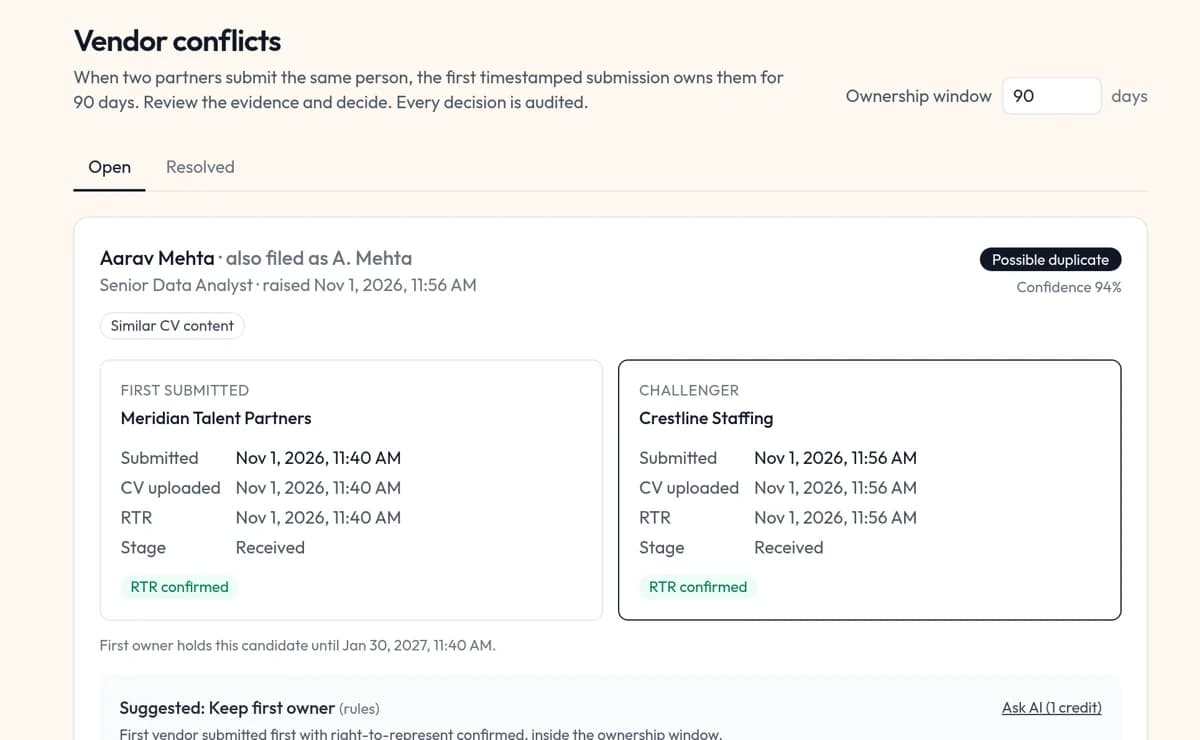
Vendor conflicts: evidence side by side, first submitter owns the candidate
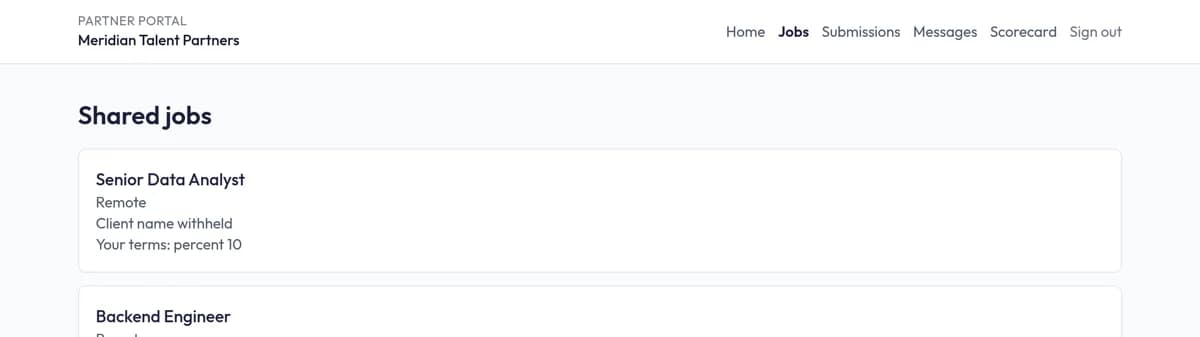
Vendor portal: only the jobs you share, nothing else in your ATS
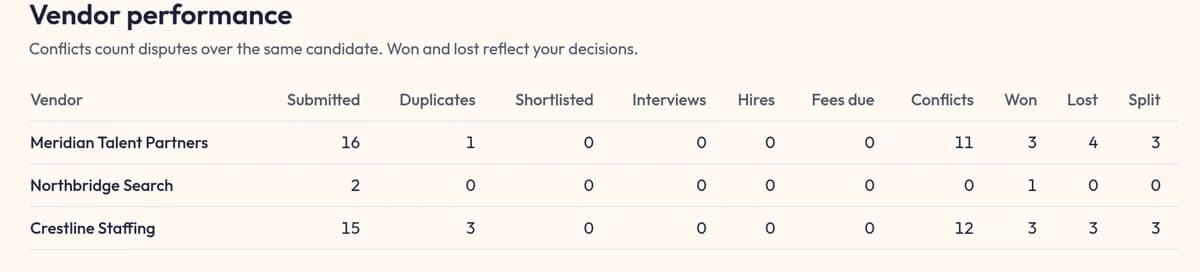
Vendor scorecards: quality, not just volume
Complete catalogue
Every capability, in one place
Scan the full set. Screens above show the product with sample data; the list below is the exhaustive index.
Multi-channel candidate intake
Every résumé that reaches your team becomes a clean, deduped candidate — no matter how it arrived.
Bulk résumé upload
Drop a folder of PDFs/DOCX — AI parses each into a structured candidate.
IMAP email intake
Connect a mailbox (Gmail, Outlook, etc.) via app password; résumé attachments become candidates automatically.
Email forwarding
Forward CV emails (or set an auto-forward rule) to your personal import address; attachments become candidates.
Email-history backfill
Opt-in sweep of past emails for résumés on connected IMAP mailboxes — with pause / resume.
Chrome extension
Import a LinkedIn profile in one click — open, extract, review, save.
Desktop folder sync
A tray app watches folders on your computer and syncs new résumés as they appear (folders only, not email).
CSV import
Import candidates, clients, contacts and jobs from CSV, including Generic Excel, Recruit CRM, Zoho Recruit and Manatal templates for clients, contacts and jobs. We match the columns and ask if one is unclear. Jobs are saved as drafts until you open them.
Google Drive and OneDrive import
Import CVs straight from Google Drive or OneDrive. Choose PDF or Word files yourself. Duplicates are caught the same way as other intake.
Public job board
Branded listings + apply forms; applications flow straight in.
2-layer dedup + merge
Exact + AI fuzzy matching on import, plus an after-the-fact duplicate merge tool.
AI that does the busywork
AI features that read, score, match, and draft — so recruiters spend time on people, not data entry.
Résumé parsing
Name, contact, skills, experience, CTC, and more extracted from any CV.
Fit scoring
0–100 candidate-to-job fit with reasons, highlights, and gaps.
Job suggestions
Surfaces the open roles a candidate best matches.
Candidate summaries
A recruiter-ready snapshot generated per candidate.
Outreach drafts
Personalised email messages in your voice.
Natural-language search
“React devs in Bangalore with 5+ years” → structured filters.
Boolean search
Type AND, OR, NOT, quotes, brackets or field prefixes (skill:, title:, company:, loc:, email:) in Candidates search. Plain words still mean every word is required. Turn on résumé text only when you need it.
Instant job → talent match
Rank your entire talent pool for an open role by semantic fit and location — top matches in a fraction of a second.
Similar candidates
From any profile, surface people with similar skills and background.
Interview questions
Role-specific questions generated from the job description.
AI Recruiting Agent
Ask in plain English — it searches your pipeline, shortlists, drafts outreach and suggests next steps that you approve with one click. (Pro; included in the free trial; 3 free runs a month on Lite, 20 on Starter)
Pipeline & workflow
Move candidates from applied to placed with automation and interview logistics built in.
Kanban pipeline
Drag-and-drop stages with per-stage history.
Automation rules
Trigger emails, follow-ups, and notifications on stage moves — with approval modes. (Starter+)
Drip sequences
Scheduled multi-step nudges (e.g. placed-candidate check-ins). (Starter+)
WhatsApp & SMS
One-tap WhatsApp and SMS messages from your own phone with ready-made templates, logged on the timeline. Every plan.
Follow-up tasks
Due-dated reminders with timezone-aware notifications.
Pipeline health & velocity
Stuck-stage alerts, bottleneck detection, time-per-stage.
Interview scheduling
Rounds, interviewers, and Google Calendar events.
Candidate self-scheduling
Send a link; the candidate books an open slot.
Interview notes + AI summary
Notes distilled into strengths, concerns, and a hire recommendation.
Setup checklist
A short checklist on the dashboard walks a new desk through its first job, CVs, a pipeline move and sharing the shortlist. Sample profiles do not count. Optional setup tips on day 1, 3 and 7 of a trial can be turned off in Profile.
Clients & portal
A shared workspace so clients see shortlists, give feedback, and talk to you — without email ping-pong.
Client management
Companies, contacts, fee agreements, and health scores.
Client portal
Shared shortlists with AI briefs, ratings, structured feedback, and side-by-side compare. Shortlist links work on every plan; login accounts for clients are Starter+.
Client accounts
Invite-based logins scoped to one client’s candidates. (Starter+)
Per-candidate chat
Threaded messaging between recruiter and client on each shortlist. (Starter+)
New position requests
Clients submit role requests you accept or decline. (Starter+)
Offer letters + e-sign
Generate an offer letter and let the candidate sign it online with free built-in e-signature. (Starter+; logo branding on Pro)
Candidate status page
Applicants get a private link showing where they stand.
Partner Network (vendors & sub-agencies)
Extend your desk through trusted partner agencies, with clean ownership and full control. (Pro; included in the free trial)
Share jobs with vendors
Choose which jobs each vendor sees, with their own terms, and keep the client name withheld if you prefer.
Separate vendor portal
Vendors sign in at sohamrecruit.com/vendor/login to see shared jobs, submit candidates, message you and track status. No access to your ATS, clients or database.
10 vendors, 3 logins each
Pro and the free trial include 10 vendor companies, each with up to 3 portal logins.
First in owns the candidate
The first timestamped submission owns the candidate for 90 days (adjustable). Later submitters are told politely, and never told who got there first.
Conflicts view
Evidence side by side: submission, CV and right-to-represent times. Keep the first owner, transfer, split credit, or mark “not the same person”, with every decision audited and both vendors notified.
AI duplicate detection
Same email or phone, similar names and CV text, plus an AI semantic match catch the same person submitted under a different name.
Vendor scorecards
Submissions, duplicates, shortlists, interviews, hires and conflicts won or lost, per vendor.
Business development & revenue
The commercial half of the split desk — track deals, forecast, and see where revenue comes from.
BD prospecting pipeline
Kanban of leads → won/lost with deal value and owner.
Weighted forecast
Stage-probability forecast of open pipeline value.
Overdue follow-up digests
Daily nudges on prospects that need attention.
Revenue analytics
Placements, fees, and revenue trends at a glance. (Starter+)
Placements, invoicing & commissions
Close the loop from placement to payout — invoices, accounting exports, and recruiter commissions.
Placements
Track placed candidates with fees and status, on every plan.
Placement invoicing
Numbered PDF invoices with your branding and tax details, on every plan.
Accounting export
Import-ready CSV for Xero, QuickBooks, Zoho, or Tally. (Starter+)
Commission splits
Per-placement account-manager / delivery splits with defaults. (Starter+)
Payout settlements
Mark recruiter commission paid per month, with an audit trail. (Starter+)
Recruiter scorecards
Placements, time-to-hire, conversion, and earnings per recruiter. (Starter+)
Reporting & insights
Answer “how are we doing?” without exporting to a spreadsheet.
Custom report builder
Pick an entity, columns, filters, and group-by; save and export as CSV. (Starter+)
Hiring reports
Pipeline funnel and time to hire on every paid plan; recruiter performance and deeper analytics on Starter+.
Dashboard analytics
Pipeline funnel, placements, revenue, interviews, and sources.
Talent pool
A per-tenant passive bench that fills and clears itself automatically.
Activity log
An immutable, searchable, company-wide audit trail of every candidate change. (Pro; each candidate's own history is on every plan.)
Integrations
Works with the tools recruitment consultancies already use.
Send with Gmail (OAuth) or your own SMTP mailbox. Résumés arrive over IMAP — Gmail, Outlook, and other providers, via an app password.
Calendars
Google Calendar events when an interview is scheduled.
Naukri / Zwayam
Post jobs and receive applications (Starter+; where enabled with your Zwayam credentials).
Zapier app
Triggers for new candidates, applications, stage changes and signed offers; actions to create or update candidates. (Starter+)
Data API
REST API with tenant-scoped keys (Pro).
Outbound webhooks
Signed event payloads to your own endpoints (Pro).
Job feed (XML)
One public XML feed, https://sohamrecruit.com/api/jobs/feed?src=<board>, for boards that read it. LinkedIn job wrapping is one use. Only open roles on your career page are included. Drafts, hidden roles, a confidential client name, jobs with an age limit or a 9-9-6 schedule, and roles you exclude from job boards stay out. The link in Settings is a preview of your own workspace.
Security & compliance
Built for a global audience — privacy and data protection are first-class.
Multi-tenant isolation
Strict per-tenant data separation, enforced at the database.
Encryption at rest
AES-256-GCM for all sensitive stored credentials.
GDPR / DPDP
Full data export (Art. 20) and right-to-erasure / SAR workflow (Art. 17).
Audit logging
Admin-action and candidate-change trails, retained for 5 years.
Candidate languages
Candidate-facing pages and emails in English, Hindi, Spanish, French, German and Arabic.
Role-based access
Admin, recruiter, BD, and client roles with the right visibility each.
Unlimited paid seats
Paid plans have unlimited seats, billed per seat. The free trial and the Free plan allow 5 users.
Email suppression
Per-tenant suppression so bounces and unsubscribes are honoured.
Help and support
Get answers about plans and how the product works, without leaving the page.
SohamRecruit Support Team
Chat from sohamrecruit.com marketing and help pages about plans, features and how the product works. It quotes the current prices for new sign-ups: Lite $12, Starter $24 and Pro $39 per seat a month (₹599, ₹999 and ₹1,999), and annual billing is pay for 10 months, get 12. Common questions are answered in seconds from a curated FAQ and saved answers. It says so when it does not know, and a teammate can follow up by email on weekdays, 9:00–18:00 IST. Included at no extra cost. The same chat is being rolled out inside the app and the client portal.
Start free — 30-day trial
Free for 30 days — core ATS + AI (trial unlocks gated surfaces for evaluation). Paid plans have unlimited seats, billed per seat. Pick a paid plan when you're ready. No credit card to start.